Roundup

Best Filament Dryers and Dry Storage

Moisture is the single most common cause of print-quality problems that new users blame on their printer or slicer settings. PLA absorbs humidity in as little as 24 hours in a humid environment, producing popping, stringing, and rough surface texture that no amount of retraction tuning will fix. PETG, TPU, nylon, and PC are even more moisture-sensitive. A filament dryer removes absorbed moisture by holding the spool at a specific temperature for several hours, typically 45 to 55 degrees Celsius for PLA, 60 to 65 degrees for PETG and TPU, and 70 to 80 degrees for nylon. This category covers both active dryers for immediate drying and dry-storage solutions for keeping spools moisture-free between prints.

Compared 04
Top pick SUNLU FilaDryer S4
Updated Jul 2026
Quick answer

Our top pick is the SUNLU FilaDryer S4, the most capable option here: four-spool capacity with digital control and dual feed ports that dries a full AMS set while you print. Single-material users save money with the SUNLU FilaDryer S2, which covers PLA through ABS under $50, and dry climates can lean on PrintDry desiccant containers for passive storage.

LayerGrade may earn a commission from links below, at no cost to you.

REF 01 TOP PICK Amazon
SUNLU FilaDryer S4
SCORE 4.6 / 5.0

SUNLU FilaDryer S4

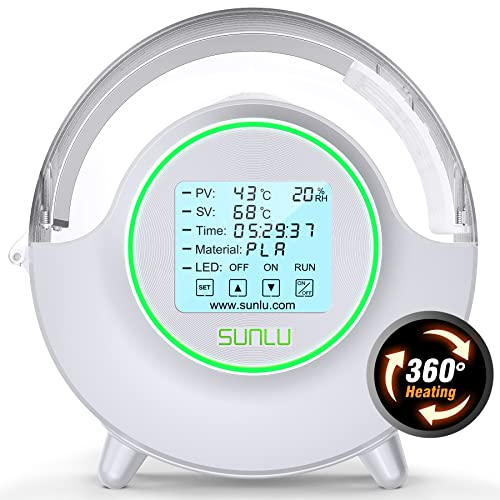
The S4 is SUNLU's four-spool dryer, offering the same temperature range as the S2 but scaling to users who rotate multiple materials. Two spools can feed simultaneously, making the S4 practical for multi-material setups like the Bambu AMS where several filaments need to be conditioned at the same time. Digital temperature and timer controls are more precise than the S2's dial.

BEST FOR
Multi-material AMS users, Bambu Lab X1C and P1S owners running several filament types, and any printer who regularly cycles between PLA, PETG, TPU, and ABS without wanting to dry spools individually.
PRICE
$60 to $85
  1. 1Four-spool capacity handles a full AMS filament set or multi-material print queue in a single drying cycle
  2. 2Digital temperature control is more accurate than the S2 dial for materials with tight drying temperature requirements
  3. 3Dual simultaneous feed ports allow two spools to print while drying

Larger footprint requires dedicated shelf or surface space near the printer

REF 02 BEST VALUE Amazon
SUNLU FilaDryer S2
SCORE 4.5 / 5.0

SUNLU FilaDryer S2

The SUNLU S2 is the most widely recommended entry-level filament dryer in the hobby. It accepts one spool, heats to between 35 and 70 degrees Celsius, and can run continuously during printing to prevent moisture re-absorption. The S2's temperature range covers PLA (45 to 55 degrees), PETG and TPU (60 to 65 degrees), and ABS and ASA (65 to 70 degrees). At under $50, it is the most accessible path to moisture-free printing.

BEST FOR
First-time filament dryer buyers and printers who work with one material type at a time and want to verify whether drying improves their print quality before investing in a larger unit.
PRICE
$38 to $52
  1. 135 to 70 degree Celsius range covers PLA, PETG, TPU, ABS, and ASA drying requirements
  2. 2Can run during printing to keep filament dry as it feeds, not just as a pre-print treatment
  3. 3Budget price makes a dryer accessible for users who do not want to spend significantly before seeing results

Single-spool capacity requires multiple units or multiple drying sessions for users with diverse material queues

REF 03 NO.03 Amazon
EIBOS Filament Dryer Box
SCORE 4.5 / 5.0

EIBOS Filament Dryer Box

EIBOS positions itself above the SUNLU S2 with a brushless motor internal circulation fan, precise PTC heating element, and a humidity display showing real-time moisture level inside the chamber. The humidity readout is the differentiating feature, it tells you when the spool is actually dry rather than requiring you to guess based on elapsed time at temperature.

BEST FOR
Printers who want data-confirmed drying rather than time estimates, particularly useful for nylon and engineering materials where incomplete drying produces immediate and costly print failures.
PRICE
$45 to $65
  1. 1Live humidity display shows actual chamber moisture, eliminating guesswork about drying completion
  2. 2Brushless circulation fan distributes heat more evenly than convection-only designs
  3. 3Supports printing directly from the dryer chamber with a filament guide port

Single-spool capacity like the S2; requires multiple units for multi-material workflows

REF 04 NO.04 Amazon
PrintDry Filament Container with Desiccant
SCORE 4.3 / 5.0

PrintDry Filament Container with Desiccant

PrintDry's dry storage containers provide passive moisture protection for spools not currently in use. Each container holds one spool, includes a desiccant packet holder, and seals with a silicone gasket. For users who do not print nylon or engineering materials but want to protect their PLA and PETG collection between print sessions, passive dry storage is a lower-cost solution than an active dryer.

BEST FOR
Users who want to protect their filament collection during storage without investing in multiple active dryers, particularly effective in dry climates where filament absorbs moisture slowly.
PRICE
$14 to $20
  1. 1Airtight silicone gasket seal maintains low-humidity environment for passive storage
  2. 2Desiccant packet holder included; compatible with standard rechargeable silica gel packs
  3. 3Budget solution for protecting a filament collection without the cost of active dryers

Passive storage prevents moisture absorption but does not dry already-wet filament; pair with an active dryer for restoration

The method

How we chose

We evaluated each option on build quality, real-world performance, and value. Our top pick, SUNLU FilaDryer S4, earned the spot. The S4 is the practical filament dryer for users who have confirmed that drying matters and want to scale up. The four-spool capacity transforms the drying workflow from a serial chore into a parallel background process. The comparison above highlights exactly who each pick is best for.

FAQ

Best Filament Dryers and Dry Storage: FAQ

How do I tell if my filament is wet?+

Heat the nozzle to printing temperature and extrude slowly. Popping, crackling, or hissing is steam from moisture flashing off in the melt zone. Milder cases show up as stringing that gets worse over time, rough or grainy surfaces, and fine bubbles on flat faces. These often look like slicer problems, so rule out moisture before tuning retraction.

Do I actually need a filament dryer, or is sealed storage enough?+

It depends on your climate and materials. In a dry space, sealed boxes with rechargeable desiccant keep PLA and PETG print ready. In humid areas, or for thirsty materials like TPU, nylon, and PC, an active dryer is worth it. Storage prevents moisture; only an active dryer removes moisture already absorbed by a wet spool.

What temperature and time should I use to dry each filament?+

Rough targets: PLA at 45 to 55 degrees Celsius for four to six hours, PETG and TPU at 60 to 65 degrees for four to six hours, ABS and ASA at 70 to 80 degrees for six to twelve hours, and nylon at 80 to 90 degrees for eight hours or more. Stay below each material's softening point so strands do not fuse.

Can I print straight from a filament dryer?+

Yes, and in humid environments it is the most reliable approach. Many dryers have a guide port that feeds filament from the heated chamber directly to the extruder, so the spool stays dry through long prints. This print in dryer mode prevents the rapid re absorption that happens within hours of pulling a spool out in a humid room.

How long does dried filament stay dry once I take it out?+

Not long in humid air. PETG, TPU, and nylon can begin re absorbing moisture within hours, while PLA is more forgiving and lasts days. Seal spools in an airtight container with fresh desiccant immediately after drying, ideally while still warm, or run print in dryer mode for long jobs to keep conditions stable.